Monday, December 21, 2009
Parsing Windows-encoded CSV file, again
This post continues a topic "how to deal with UTF-16-LE encoding", see this post.
If writing UTF-16-LE is no picnic, reading is even more challenging, unless you want to read the whole file as one line. If you prefer or are forced to use per-line approach, then you'd better be aware that properly encoded UTF-16-LE file includes zero byte '\0' after the end-of-line symbol, that is, every line ends up with four bytes 0x0d000a00, or if you will '\r\x00\n\x00'. However, when reading line-by-line, processing stops at '\n' and following '\x00' is interpreted as belonging to the next line!
To rectify this problem, you can use this Python-based "generator" to read UTF-16-LE-encoded file lile-by-line as unicode:
def readiterator(file) :
    fh = open ( file, "rb" )
    for line in fh :
        if line == '\x00' : continue
        if line[:2] == '\xff\xfe' :
            line = line[2:] + "\x00"
        else :
            line = line[1:] + "\x00"
        res = unicode ( line, "utf_16_le" )
        yield res.encode ( "utf-8" )
    fh.close ()
One typical application of that would be parsing CSV file (e.g., reasult of Excel CSV export) using Python built-in "csv" module, which has no knowledge of encoding, though luckily does support unicode input:
cvsreader = csv.reader(readiterator(input_csv_file))
If you decide to (for example) make changes to the table and save it again as CSV file, you'll quickly discover that you can't similarly use csv.write() directly, since it does not work with unicode strings, at all. You will have to play a trick taken directly from official Python documentation, to first convert to UTF-8 and dump CSV to a temporary string , and then read this string and convert back to unicode. Here one way to do that:
class MyCSVWriter:
    def __init__ (self,file_writer) :
        self.stream = file_writer
        self.queue = StringIO.StringIO ()
        self.writer = csv.writer(self.queue)

    def writerow (self,row) :
        self.writer.writerow([s.encode("utf-8") for s in row])
        self.stream.write(unicode(self.queue.getvalue(),"utf-8"))
        self.queue.truncate(0)

    def close(self) :
        self.stream.close ()
Of course, you still need a backend to dump unicode data as UTF-16-LE-encoded file:
class MyFileWriter:
    def __init__ ( self, file ) :
        self.fh = open ( file, "wb" )
        self.lineno = 0

    def write (self, line) :
        if self.lineno == 0 :
            self.fh.write ( '\xff\xfe' )
        self.lineno += 1
        self.fh.write ( line.encode ( "utf_16_le" ) )

    def close (self) :
        self.fh.close()
These two classes finally make it possible to create a CSV "writer" which can be used to write data just retrieved by aforementioned "reader"
csvwriter = MyCSVWriter(MyFileWriter(output_csv_file))
All of these code snippets are taken from an utility parsegab.py which I write to make some very specific changes to Google Address Book, using workflow "export – fix – erase all – import back".
Labels: CSV, python, unicode, windows

Sunday, May 31, 2009
Mounting windows shares
Procedures to mount Windows shares from remote machines changed so many times during lifespan of Linux, that an attempt to do a search in Google gives a mix of solutions from using "smbmount" to "mount -t smb".
Here is the latest and greates solution. Make sure you have "smbfs" package installed and do this :
% sudo mount -t cifs //192.168.1.102/share_name /media/my_share -o \
  username=theuser,password=thepass,iocharset=utf8,file_mode=0777,dir_mode=0777
With option "iocharset=utf8" it ought to handle international characters in all Windows NT-based systems. If you need to mount drives from Windows 95/98/Me, different translation options will be necessary.
see this page for more detailed explanations.
Labels: linux, Samba, Ubuntu, unicode, web-services, windows
Sunday, April 26, 2009
WebDAV, problems all around
It seems almost incomprehensible how many problems emerge with simple WebDAV file hosting. While apache DAV server, and clients built-in into both Windows Shell and GNOME have been available fr many years, I still can't make it to work properly.
Here is a brief list of problems:
Apache 2 Server. Its problem is that it is bit difficult to make server work with both "resular" and SSL modes. This typically emerges as failure to "copy", "move" or "rename" file in non-SSL mode, while everything else seems to work.
Good explanation is available here:
The main issue was that the production system runs on https and there was a reverse proxy setup for this system. So, all the "https" requests were converted to "http" at this proxy level and forwarded to the main system. This was the main culprit.
Here is an example of HTTP request for the MOVE resource request for a WebDAV resource. For brevity I removed all unnecessary details.
MOVE contentLocation //request line, some https location, URI of webDAV resource
Destination:destinationLocation // this is the HTTP request header, should be absolute URI according to specifications.Overwrite: "F" // this is also a HTTP request header
So, when the reverse proxy sees the request line, it knows that it has to convert this to HTTP request but the header Destination also contains an HTTPS request which would be ignored by the proxy. So, when the request reached the server, we are moving the resource from an URI which begins with a http to a URI which begins with an https. Server treats this request as a request to move a WebDAV resource from one server location to another server location.(Refer RFC: http://greenbytes.de/tech/webdav/rfc2518.html#METHOD_MOVE). This was the source of the main problem.
Linux/GNOME GVFS driver: Seems to work most of the time,but
- Fails to handle paths with user name "davs://username@server.com/path". "Top listing" is shown correctly, but an attempt to change directory fails. Reason unknown;
- When using drag-and-drop, or "cut/paste" interface, it attempts to "copy" file and then "delete" the original. I could not find any way to invoke "MOVE" command.
Windows (old driver). This is "old" Windows-2000 implementation, which identifies itself as "Microsoft Data Access Internet Publishing Provider DAV". This seems almost the most reliable implementation, and it worked for me for a while, but now it shows directory "Temp" as "temp" (all other directories similarly named are OK), and obviously fails to chdir to it. Reason unknown.
Windows (new driver, XP and newer). Identifies itself as "Microsoft-WebDAV-MiniRedir/5.2.3790". Apparently only intended to work with Microsoft IIS, not compatible with Apache. This pages gives a consice overview:
For implementation of WebDAV on Windows XP and later , MSFT made it's own interpretation of the standard to work best with the Windows IIS servers. The problem due to this is three fold:
- Windows XP authenticates users using the format "domain\username" by the mechanism of "Microsoft-WebDAV-MiniRedir/5.1.2600". Whereas Windows 98SE/2000 authenticates users as "username" using the mechanism of "Microsoft Data Access Internet Publishing Provider DAV 1.1".
- The problem lies with the implementation of "Microsoft-WebDAV-MiniRedir/5.1.2600". If authentication is sent as "domain\username" then it would be received as "usernamedomain" or "usernamehostname" by the Web server and not as "username".
- Also as per "Microsoft Knowledge Base, Article ID: 841215" Windows XP disables "Basic Auth" in its "Microsoft-WebDAV-MiniRedir/5.1.2600" mechanism by default for security reasons. But WebDAV expects "Basic Auth".
There are hundreds pages how to trick it to invoke "old" implementation, including some on the same page mentioned above; there is also a separate discussion regarding Windows Vista, where "old" implementation has to be separately installed. Windows 7 status is unknown.
Platform-independent clients.
- SkunkDAV Java-based client is simple and reliable, but unfortunately I could not make it support SSL-based access;
- Cadaver is CLI-based tool. It seems to work fine.
Update (12-May-09). "Official" subversion book has a list of DAV clients. Among some known clients, some of them mentioned above, there is another Jaba-based client "DAV Explorer", it has been last updated in 2005 and looks a bit better than SkunkDAV, though I can't say there is a big difference.
Also, its help file says that in order to enable SSL in Java one has to run Java with -Dssl=true, and only from version 1.4 on; for earlier versions, one has to download special Java Secure Socket Extensions. It is likely with if run with these options, SkunkDAV will work ok with SSL DAV.
Labels: GNOME, linux, server, Ubuntu, web-services, windows
Sunday, July 27, 2008
Accessing SMB shares under firewall
There are, generally speaking, five "standard" ways to make files on (Linux) server available to clients:
- Using FTP server;
- If sshd is running, files could be accessed with SFTP;
- If Web server is running, WebDAV could be used;
- Using NFS (see earlier port);
- Using SMB-shares.
In principle, last choice - using Samba shares - is supposed to be most "native" with respect to Windows clients; let's consider how difficult it is to use it practically...
For the following, we assume that SMB server is running on "SERVER" and we'll be using it to access file of local regular user "user".
1. Install and configure samba
1.1. Install
# apt-get install samba smbclient
1.2. Modify config file.
Here we zero in on "minimalistic" approach, which only requires minimal changes to default config file (as distributed with Debian, anyway). It has one built-in share "homes" which provides access to each user's home directory (it is enabled by default, but in read-only mode)
1.2.1. Backup default config file:
cp /etc/samba/smb.conf /etc/samba/smb.conf.original
1.2.2. Modify global settings:
workgroup = <Enter some name>
interfaces = <enter some interfaces from /sbin/ifconfig, e.g. lo venet0:0>
printcap name = /dev/null (shut down all complaints in logs about printers)
encrypt passwords = yes (or else you won't connect from Windows NT and up)
security = user (this should be the default anyway)
smb passwd file = /etc/samba/smbpasswd (see below why/when this is necessary)
1.2.3. Modify setting for share.
If you are satisfied with read-only access to user's directory, there is nothing more to change. If you want read-write access, there are some settings to adjust:
writable = yes
create mask = 0644
directory mask = 0755
Note on "encrypt password": if encrypt password = false, you don't need "smb passwd file", system password file will be used. For some reason it did NOT work for me if "encrypt password = true". As suggested in [8], I did this:
cat /etc/passwd | mksmbpasswd > /etc/samba/smbpasswd
smbpasswd user (for each use who needs his home dir access via SMB)
1.2.4. Restart server:
/etc/init.d/samba restart
1.2.5. Test installation (on the server as user)
smbclient //localhost/homes
If you can, test from another location which does not block outgoing ports 139, 445
smbclient //SERVER/homes -U user
2. Setup Windows computer
In principle, the following command
net use [<drive letter>:] \\SERVER\homes /user:user /persistent:no
should be able to mount corresponding share. However, for this to work it is necessary that client computer had direct access to server using ports 139 and/or 445. If server is to be used in local subnet, this is undoubtedly so and no more setup is required. However, if you are accessing server from the Internet, and your ISP is blocking these ports (like RCN), read on.
The idea is to try to mount SMB shares on SERVER as if they were available on localhost; intercept requests made on (local) ports 139 and 445 and somehow forward them to SERVER.
This however appears to be more difficult than it sounds. The problem is, Windows by default binds all adapters on port 445 :
> netstat -ano | grep 445
TCP 0.0.0.0:445 0.0.0.0:0 LISTENING 4
and the only way to make this port available for binding is to disable NetBios completely, which is rather pointless, since then you won't be able to amount anything at all (if, however, you want to play with this, refer to [5] and [6]).
Fortunately, however, usually Windows, after failing to mount using port 445, falls back to port 139, which apparently you can bind, albeit not on "standard" loopback adapter 127.0.0.1; (well, you can bind to it, but it won't work for whatever reason), thus necessity to create new loopback connection. This "fallback" logic is in no way guaranteed and moreover has reportedly been broken by a recent Vista patch; but at least on XP this seems to work, as long as you implement 2.1 and 2.2 below.
2.1. If you are using Windows XP, install this Windows patch [3].
 2.2. For your existing Internet connection, enable option "EnableBIOS over TCP/IP" (in fact, it may be sufficient to do so for any Internet connection. Quoting from [1]: "It also appears that if there are no valid interfaces with NetBIOS over tcp enabled, then windows will not attempt to use port 139")
2.3. Add new Microsoft loopback interface and bind it to port 10.0.0.1, see [4] and [1] ([4] has some screenshots from Vista; XP installation is similar).
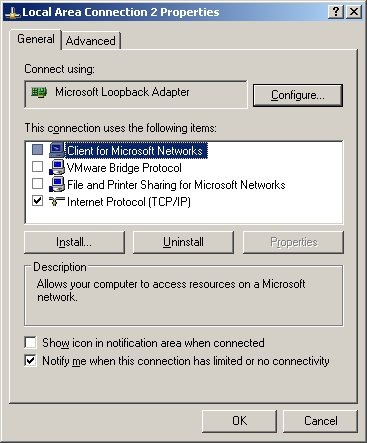
2.4. It may or may not be necessary, but I also (a) disabled all "items" for new 10.0.0.1 loopback connection (except TCP/IP, see first screenshot above) ; (b) enabled LMHOSTS lookup; (c) disabled NetBIOS over TCP/IP (see second screenshot) ; (d) disabled "File and 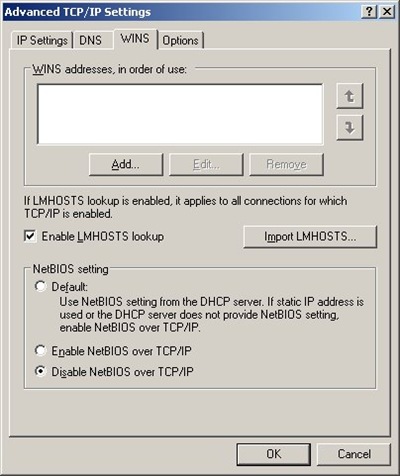 Printer Sharing for Microsoft Networks" for ALL connections;
2.5. Reboot and you are all set!
3. Setup port forwarding
This can be done in one of the two ways.
You can use of the many existing utilities for port forwarding. (It is more correct in fact to speak of reversed port forwarding, but people usually call it port forwarding all the same). In this case you need a (non-blocked) port to forward to, and your Samba server should be told to listen on this port.
Alternatively, you can use ssh port tunneling capability and tunnel port 139 through ssh. This requires more complicated setup and is more difficult to automate, but does not require any additional port to be used and has an additional benefit of securing your Samba traffic via ssh.
3.1. Using ssh tunneling.
3.1.1. With Cygwin (or similar CLI) ssh:
ssh -L 10.0.0.1:139:localhost:139 SERVER
3.1.2. Using PuTTY
(see screenshot in [4]). There are various ways to automate this using pageant, but I won't get into this here.
3.2. Using port forwarding.
3.2.1. Add another option to smb.conf :
smb ports = 445 139 8445 8139
3.2.2. Configure AUTAPF (shareware) or PassPort (Open Source) to forward port 139 on local adapter 10.0.0.1 to port 8139 on SERVER.
AUTAPF is more convenient as it immediately tells you if it can't bind a port thus it is better for testing; once you are comfortable with the setup, you can switch to free PassPort.
4. Using SMB shares
4.1. Under Windows
net use [<drive letter>:] \\10.0.0.1\homes /user:user /persistent:no
(Unless user if Windows user name and password matches, you'll be asked to enter server password at this point)
4.2. Under Linux
Make sure you have "smbfs" installed ("apt-get install smbfs") and issue this command as super-user:
mount -t smbfs -o username=user%<user password>,uid=<local username>,port=8139 //SERVER/homes <local mount point>
(You can use option -credential in place of plain text user name/password, see "man smbmount" and this page)
4.3. Using smbclient, any platform
For any platform which has utility "smbclient" or equivalent, and provided that you've configured SMB server to listen to port 8138, you can use this
smbclient //SERVER/homes -U user -p 8139
to access your files.
You can get MinGW-based smbclient.exe for Windows from here (it works fine except that you have to specify password in the command line); alternatively, you can build your own Cygwin-based version using one of the patched published here (you'll need to disable first test in Samba source file source/tests/summary.c)
References:
[1] Sharing (tunneling) Samba/CIFS/SMB file systems over SSH
[2] How to tunnel Samba via ssh from Windows XP without having to disable local NetBIOS
[3] Programs that connect to IP addresses that are in the loopback address range may not work as you expect in Windows XP Service Pack 2
[4] Vista or XP Accessing Samba shares securely over SSH
[5] Disabling Port 445 (SMB) Entirely
[6] After you disable the "Client for Microsoft Networks" option for a dial-up connection, the dial-up connection is still active on a Windows XP-based computer
[7] "Network Location Cannot be Reached" when accessing shares
[8] SMBCLIENT CONNECTION ERROR
Labels: debian, linux, Samba, server, SMB, windows
Tuesday, June 10, 2008
Visual Studio tricks
Well, this is not really a trick but rather a trivial remark, but Visual Studio entertains some peculiar notion of "default libraries", which means, basically, that object file "knows" which basic system libraries like LIBCMT.LIB (basic C multithreaded library) or LIBCMTD.LIB (debugging version). That means that if you have certain 3-rd party or external libraries which you only have available to you in "non-debugging" version, and when try to link them with your project in "Debug" configuration, linker may want to include both LIBCMT.LIB and LIBCMTD.LIB, creating multiply-defined symbols and failing the build.
For some reason, problem (for me) only appears when I try to use STL library, which then causes diagnostics like this:
LIBCMTD.lib(dbgheap.obj) : error LNK2005: __heap_alloc already defined in LIBCMT.lib(malloc.obj)
LIBCMTD.lib(dbgheap.obj) : error LNK2005: __recalloc already defined in LIBCMT.lib(recalloc.obj)
LIBCMTD.lib(dbgheap.obj) : error LNK2005: __msize already defined in LIBCMT.lib(msize.obj)
LIBCMTD.lib(malloc.obj) : error LNK2005: _V6_HeapAlloc already defined in LIBCMT.lib(malloc.obj)
LIBCMTD.lib(dbghook.obj) : error LNK2005: __crt_debugger_hook already defined in LIBCMT.lib(dbghook.obj)
LIBCMTD.lib(sbheap.obj) : error LNK2005: __get_sbh_threshold already defined in LIBCMT.lib(sbheap.obj)
LIBCMTD.lib(sbheap.obj) : error LNK2005: __set_sbh_threshold already defined in LIBCMT.lib(sbheap.obj)
LIBCMTD.lib(sbheap.obj) : error LNK2005: __set_amblksiz already defined in LIBCMT.lib(sbheap.obj)
LIBCMTD.lib(sbheap.obj) : error LNK2005: __get_amblksiz already defined in LIBCMT.lib(sbheap.obj)
LIBCMTD.lib(sbheap.obj) : error LNK2005: ___sbh_heap_init already defined in LIBCMT.lib(sbheap.obj)
LIBCMTD.lib(sbheap.obj) : error LNK2005: ___sbh_find_block already defined in LIBCMT.lib(sbheap.obj)
LIBCMTD.lib(sbheap.obj) : error LNK2005: ___sbh_free_block already defined in LIBCMT.lib(sbheap.obj)
LIBCMTD.lib(sbheap.obj) : error LNK2005: ___sbh_alloc_block already defined in LIBCMT.lib(sbheap.obj)
LIBCMTD.lib(sbheap.obj) : error LNK2005: ___sbh_alloc_new_region already defined in LIBCMT.lib(sbheap.obj)
LIBCMTD.lib(sbheap.obj) : error LNK2005: ___sbh_alloc_new_group already defined in LIBCMT.lib(sbheap.obj)
LIBCMTD.lib(sbheap.obj) : error LNK2005: ___sbh_resize_block already defined in LIBCMT.lib(sbheap.obj)
LIBCMTD.lib(sbheap.obj) : error LNK2005: ___sbh_heapmin already defined in LIBCMT.lib(sbheap.obj)
LIBCMTD.lib(sbheap.obj) : error LNK2005: ___sbh_heap_check already defined in LIBCMT.lib(sbheap.obj)
LIBCMTD.lib(sbheap.obj) : error LNK2005: ___sbh_pHeaderDefer already defined in LIBCMT.lib(sbheap.obj)
LIBCMTD.lib(isctype.obj) : error LNK2005: __isctype_l already defined in LIBCMT.lib(isctype.obj)
LIBCMTD.lib(isctype.obj) : error LNK2005: __isctype already defined in LIBCMT.lib(isctype.obj)
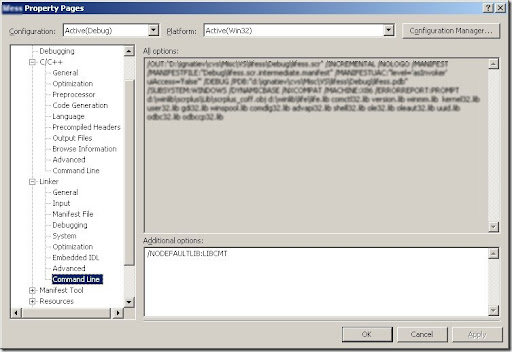
The solution is to add option "/NODEFAULTLIB:LIBCMT" to the linker; this can (only) be done via manually editing linking options in project configuration:
Labels: visual studio, windows
Thursday, May 15, 2008
Using NFS mounts under Windows
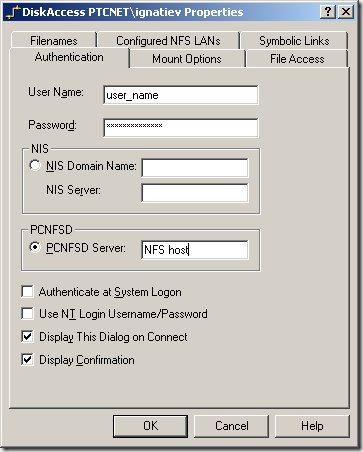 When one needs to access files on remote Linux workstation from a windows computer, there are two obvious ways in which this can be done: run Samba server on Linux or NFS client on Windows. While former approach is I guess by far more popular, here I will consider later one: sharing files via NFS client/server.
First, we need to install a NFS client. I don't know of any free one, and perhaps the best known and reliable commercial solution is DiskAccess from Javvin Technologies. Installation is straightforward.
Problems begin though when it turns out that in order to access NFS file system with DiskAccess one needs certain authentication configuration setup. This could be and is done in a corporate environments with NIS (formerly Yellow Page server).
However, when we only have two machines that need to talk to each other, this might be an overkill and a disaster to setup. This is perhaps why there is another option in aforementioned dialog, "PCNFSD Server". What is that?
As the name suggests, this is perhaps mini-daemon intended to facilitate communication between "PC" and NFS server. This sounds good, except that this utility is barely known even to Google, isn't in any Linux distribution, and as a matter of a fact "canonical" version from SUN is perhaps older than Linux itself.
Fortunately, one kind soul invested necessary effort to port this to Linux
- Get it here: http://ftp.linux.org.uk/pub/linux/Networking/attic/Other/pcnfsd/linux_pcnfsd2.tgz, untar and unzip into a new directory;
- Edit file common.h to uncomment "#define SHADOW_SUPPORT"
- Make other changes necessary to build successfully. On RHE4, I had to define "LIBS= -lcrypt" in Makefile.linux;
- make -f Makefile.linux
- Run linux/rpc.pcnfsd as root. No configuration is required.
Fast, simple, and keeps DiskAccess happy.
Of course, what remains to be done is to "export" a directory and "mount" it under Windows.
To export directory /ext/user on RHE4:
- Add line like this:
/ext/user 192.168.2.1/255.255.252.0(sync,rw)
to file /etc/exports (provided that this IP subnet is an accurate description of your local net, this will export directory in read-write mode to the local file system only. You can substitute '*' for IP range if security is not on the top of your priorities list); - Reset list of exported directories with /usr/sbin/exportfs -r or /usr/sbin/exportfs -a ;
- While this is supposed to be enough, you may need to restart NFS server with command like this: /etc/rc.d/init.d/nfs restart
To mount exported NFS directory under Windows,
- Once after DiskAccess installation, go to control panel, select DiskAccess item and enter your credentials, and set other options as you see fit;
- You can now mount with regular Windows UI or with command like this:
net use R: \\nfs_host\ext\user
You shouldn't be forced to use drive letter, but for some reason it didn't work for me without that.
Labels: linux, NFS, server, windows
Monday, April 28, 2008
Dealing with "native" Windows encoding
Microsoft Windows and other Microsoft utilities, like Microsoft Office, use encoding "UTF-16LE" by default; if they offer you multiple choices of encoding, they call it simply "Unicode". If the goal is to generate Unicode files which could be opened by all Microsoft applications, these better be in UTF-16LE.
Multiple language and libraries offer built-in conversion to UTF-16LE; however, one must be aware of two potential problems with that: (1) standard 4-byte header that Windows expects (and writes on output), and (2) potential problem with built-in DOS line ending mode ("text mode"); files must be written in "binary" mode.
Proper way to create UTF-16LE file in Python would be this:
fh = open ( "Test.txt", "wb" )
fh.write ( "\xff\xfe")
fh.write ( u"Проверка\r\n".encode("UTF-16LE" ) )
fh.close()
Labels: python, unicode, windows
Saturday, March 22, 2008
Volume Control in WIndows XP
This sounds like a trivial advice, but if you see volume control icon disappear from your taskbar notification area in Windows XP, you can start volume control application by using command,
$SYSTEMROOT\system32\sndvol32.exe
Labels: windows
Friday, October 26, 2007
TRAMP in Emacs 22.1
It always feels kind of bad when after upgrading beta-version to a next stable release something stops working.
For nearly 6 years after release of Emacs 21.1 I used to compile my own "beta" version of upcoming Emacs 22; this is primarily because new Emacs finally promised to implement proper support of Unicode. For about 4 or 5 years these releases always were sufficiently stable to use in everyday work; one of the most exciting features of Emacs 22 (unrelated to Unicode) was TRAMP, which came to replace outdated ange-ftp to provide transport-independent support for remote file editing.
I must say that in my situation when I almost always work with 2-3 (or more) computers with different OS's available through different means (ftp, ssh, telnet) this feature is extremely useful for me; no other utility I am aware of provides such extensible and configurable transparent access to remote file systems....
So you can understand my disappointment when after installing now-"stable" version Emacs 22.1 (released in June 2007), I found TRAMP to be seriously broken, in more than one way.
First problem I have encountered was lack of file completion; normally, pressing TAB button (once or twice) while entering file name shows possible completions or completes file name right away (if completion is unambiguous). This stopped working for good in Emacs 22.1 / TRAMP 2.0.55 .
Here is what I found out...
The gist of this specific problem is in fact Windows-specific (this is probably why no one noticed). Lisp function tramp-file-name-handler (file tramp.el) has the following logic:
     ;; When we are in completion mode, some operations shouldn't be
    ;; handled by backend.
    ((and completion (memq operation '(expand-file-name)))
     (tramp-run-real-handler operation args))
    ((and completion (zerop (length localname))
          (memq operation '(file-exists-p file-directory-p)))
     t)
This says that when we invoke tramp-file-name-handler with method = expand-file-name, TRAMP delegates to "default" expand-file-name. This was perhaps done as an innocent attempt to improve performance and it does not as and of itself create problems under Unix; however, under Windows "regular" TRAMP names like "/user@machine:path" get "expanded" to "Windows" names like "c:/user@machine:path" (or other drive letter). This "expanded" non-existent path then gets passed to subsequent calls blocking successful file completion.
One solution is simply to block this "delegation": ((and nil completion (memq operation '(expand-file-name)))
(tramp-run-real-handler operation args))
((and completion (zerop (length localname))
(memq operation '(file-exists-p file-directory-p)))
t)
This makes TRAMP to work, but it is indeed quite slow.
Better solution is to modify file completion. We create new function
(defun expand-file-name-noprefix (name &optional default-directory)
 (let ((std-result (tramp-run-real-handler 'expand-file-name (list name default-directory)))
   (win-prefix-re "^[a-zA-Z]:"))
   (if (or (not (string-match "^/" name))
       (not (string-match win-prefix-re std-result)))
   std-result
     (substring std-result 2))))
which deletes "<drive_letter>:" prefix from "expanded" name, if it seems unwarranted; then we replace code in tramp-file-name-handler with :
     ((and completion (memq operation '(expand-file-name)))
     (tramp-run-real-handler 'expand-file-name-noprefix args))
    ((and completion (zerop (length localname))
          (memq operation '(file-exists-p file-directory-p)))
     t)
This solves problem #1, and makes Unix and Windows versions behave consistently.
However, there is another problem.
File "handlers" can receive third argument (first two are file name and directory name), which is a "filter" to apply (e.g. to feasible completions). Previously in beta versions of Emacs 22 this argument was empty, but in 22.1 file-name-completion method gets passed a filter "file-exists-p", which seems quite meaningless in my opinion: when we are asked to generate list of "completions", doesn't it go without saying we are only talking about existing files?
The result of this "enhancement" in Emacs 22.1 is that after TRAMP backend generates list of possible completions, it is obliged to separately test each of these files for "existence". This substantially slows down the performance, most noticeably if trying to complete in a directory with many entries.
The good solution for this perhaps would be to keep "cache" of "known" files so that test for "existence" wouldn't involve any communication to the server. A quick but working patch is to simply suppress this third argument (code is given below).
One more item of interest (though not technically a bug) is that previously TRAMP could not "complete" very first name after host name (that is, in a name "/user@host:toplevel/nextlevel", we could complete nextlevel but not firstlevel). In Emacs 22.1, this has been fixed, but interestingly enough this fix is not enabled by default, but rather depends on minor mode "partial-completion". This mode is otherwise harmless, so it is a good idea to always use "(setq partial-completion-mode t)" with TRAMP.
With all these points taken into account, this is how my local .emacs file looks like now to make TRAMP work in Emacs 22.1 :
  (require 'tramp)
 (if (equal tramp-version "2.0.55") ;; bundled with Emacs 22.1.1
     (progn
   (setq partial-completion-mode t)
(defun tramp-file-name-handler (operation &rest args)
 "Invoke Tramp file name handler.
Falls back to normal file name handler if no tramp file name handler exists."
;;  (setq edebug-trace t)
;;  (edebug-trace "%s" (with-output-to-string (backtrace)))

 (let ((args
    (if (memq operation '(file-name-completion))
        (list (car args) (car (cdr args)))
      args)))
 (save-match-data
   (let* ((filename (apply 'tramp-file-name-for-operation operation args))
      (completion (tramp-completion-mode filename))
      (foreign (tramp-find-foreign-file-name-handler filename)))
     (with-parsed-tramp-file-name filename nil
   (cond
    ;; When we are in completion mode, some operations shouldn' be
    ;; handled by backend.
    ((and completion (memq operation '(expand-file-name)))
     (tramp-run-real-handler 'expand-file-name-noprefix args))
    ((and completion (zerop (length localname))
          (memq operation '(file-exists-p file-directory-p)))
     t)
    ;; Call the backend function.
    (foreign (apply foreign operation args))
    ;; Nothing to do for us.
    (t (tramp-run-real-handler operation args))))))))
))  ;; if tramp-version == "2.0.55"
(don't forget to also include somewhere function expand-file-name-noprefix as given above)
Appendix 1. The reason why the first problem was not caught in time might have something to do with TRAMP not working by default in Windows at all, not without some Windows-specific customization (this is unchanged from previous versions); even if Cygwin ssh is available, this won't work (not sure why).
Proper approach is to use free Windows utility plink (distributed along with popular free Windows SSH/telnet client PuTTy). Put it in a directory from Emacs's exec-path, and use this code in your .emacs :
(defvar w32
 (not (not (string-match "w32\\|win32\\|mswindows"
             (symbol-name window-system))))
"t if running under Windows GUI, nil otherwise"
)

(when w32
 (setq tramp-methods
   '(
     ("ssh"
      (tramp-connection-function  tramp-open-connection-rsh)
      (tramp-login-program        "plink")
      (tramp-copy-program         nil)
      (tramp-remote-sh            "/bin/sh")
      (tramp-login-args           ("-ssh")) ;optionally add "-v"
      (tramp-copy-args            nil)
      (tramp-copy-keep-date-arg   nil)
      (tramp-password-end-of-line "xy"))
     ("telnet" ;; Sorry, this is NOT working yet....
      (tramp-connection-function  tramp-open-connection-rsh)
      (tramp-login-program        "plink")
      (tramp-copy-program         nil)
      (tramp-remote-sh            "/bin/sh")
      (tramp-login-args           ("-telnet")) ;optionally add "-v"
      (tramp-copy-args            nil)
      (tramp-copy-keep-date-arg   nil)
      (tramp-password-end-of-line "xy")) ;; this is questionable
     ("rlogin"
      (tramp-connection-function  tramp-open-connection-rsh)
      (tramp-login-program        "plink")
      (tramp-copy-program         nil)
      (tramp-remote-sh            "/bin/sh")
      (tramp-login-args           ("-rlogin")) ;optionally add "-v"
      (tramp-copy-args            nil)
      (tramp-copy-keep-date-arg   nil)
      (tramp-password-end-of-line nil))))
         ;; (setq  tramp-debug-buffer t)
          (setq tramp-default-method "rlogin"))
Appendix 2. TRAMP Manual given extensive information on how to debug TRAMP. The bottom line is this: create a special Lisp file, let's say, "debugtramp.el" as follows:
(setq debug-on-error t)
(setq debug-on-signal t)

(require 'tramp)
(require 'trace)

(mapcar 'trace-function-background
 (mapcar 'intern
  (all-completions "tramp-" obarray 'functionp)))
(untrace-function 'tramp-read-passwd)
(untrace-function 'tramp-gw-basic-authentication)

(setq tramp-verbose 10)
And load it before problem might occur; afterward, save buffer output-trace (huge!) to a new file and investigate the problem.
Thursday, December 21, 2006
Portable thread library
 Given how important multithreading programming has become, it is surprisingly difficult to find simple and usable portable C/C++ thead library.
In fact, this page claims there are only two such C++ libraries in existence: zthread and Boost.Threads.
zthread offers a clean, well-thought C++ design (claimed to be modeled after Java threads). Despite the fact that Cygwin was not mentioned as one of the supported platforms, it does compile and run under Cygwin with no visible (Cygwin-specific) problems. However,
- There is a complete absence of any examples, demos, unit tests, tutorials, etc. The only documentation provided is doxygen-generated.
- It appears that the implementation, rather than establishing a set of common wrappers over win32 and POSIX APIs (and perhaps others), is trying to more or less provide its own alternative implementation, perhaps having maximum platform-independence as one of the goals. As a result, library is quite volatile and does need a very active maintenance and user base, which does not seem to be there.
- As a typical example, some users report apparent problems under VC++ 6.0 which no one is able to diagnose or to comment on (thus one needs Visual .NET to use it).
- I spent long time trying to understand why my test program (under both Cygwin and Linux) was mysteriously crashing before I realized that zthread library is probably trying to do some very "intelligent" memory management, and as a result, all zthread-objects like mutex'es or threads must be dynamically allocated (via new); but then, you never need to release them...
So, is there a better alternative?
It appears that there is: it is POSIX Threads for Win32 project. They provide ready-to use libraries that can be (dynamically) linked with any Win32 application for (almost) complete POSIX thread support. See FAQ for long and interesting discussion on various ways to handle exceptions that arise from inside the library (in my experiments, I used pthreadVC1.lib)
Finally, a good pthread tutorial and documentation is available here.
Appendix. Sample C++ application implemented with zthread:
#include <string>
#include <iostream>
#include <zthread/Thread.h>
#include <zthread/Mutex.h>

ZThread::Mutex * output = new ZThread::Mutex ();

class ThreadExample : public ZThread::Runnable
{
 public:
   ThreadExample(std::string thread_name, size_t iterations)
      :   name_(thread_name), num_times_to_loop_(iterations)
   {}

   void run()
   {
      for (size_t i = 0; i < num_times_to_loop_; i++)
      {
         output->acquire();
         std::cerr << i << " " << name_ << "\n";
         output->release();
      }
      output->acquire();
      std::cerr << name_ << " finished! " << std::endl;
      output->release();
   }

 private:
   std::string name_;
   size_t num_times_to_loop_;
};

int main()
{
   using namespace std;
   using namespace ZThread;

   try
   {
      Thread t1(new ThreadExample("Thread-1", 50));
      Thread t2(new ThreadExample("Thread-2", 50));
   }
   catch (const Synchronization_Exception& e)
   {
      cerr << e.what() << "\n";
   }
}
and pthread:
#include <string>
#include <iostream>
#include <pthread.h>

pthread_mutex_t output = PTHREAD_MUTEX_INITIALIZER;

class ThreadExample
{
 public:
   ThreadExample(std::string thread_name, size_t iterations)
      :   name_(thread_name), num_times_to_loop_(iterations)
   {}

   void run()
   {
      for (size_t i = 0; i < num_times_to_loop_; i++)
      {
         pthread_mutex_lock (&output);
         std::cerr << i << " " << name_ << std::endl;
         pthread_mutex_unlock (&output);
      }
      pthread_mutex_lock (&output);
      std::cerr << name_ << " finished! " << std::endl;
      pthread_mutex_unlock (&output);
   }

   static void * prun(void * self)
   {
      ((ThreadExample *)self)->run();
      return NULL;
   }

 private:
   std::string name_;
   size_t num_times_to_loop_;
};

int main()
{
   pthread_t  p1, p2;

   pthread_create(&p1, NULL, ThreadExample::prun, new ThreadExample("Thread-1", 50));
   pthread_create(&p2, NULL, ThreadExample::prun, new ThreadExample("Thread-2", 50));

   pthread_exit(NULL);
   return 0;
}
Labels: C, C++, multithreading, threads, windows
Thursday, July 13, 2006
Alternate Data Streams (ADS)
 I just learned about "Alternate Data Streams" in NTFS, a feature which has apparently been available from day one, and I am shocked that I never, ever heard about this!
Links:
via /.
I just learned about "Alternate Data Streams" in NTFS, a feature which has apparently been available from day one, and I am shocked that I never, ever heard about this!
Links:
via /.Wednesday, May 10, 2006
Installing Python + ZSI on Windows
Now, who could ever think that in setting up my new laptop the most difficult thing would be to set up Python?
To be sure, Python is a very nice language, completely dynamic and OO, which allows you to implement a fast prototype for a complex object interaction. Then, you might want to re-implement in more "static" language like Java or just leave it Python if speed and reliability isn't among your first priorities.
However, another very nice feature of Python is a very well-done and well-supported Windows port, including a native Windows installer. There is a price to pay for this beauty: each Python release is implemented in specific Visual Studio C++/.NET version; e.g. all 2.4.* releases (latest stable release at this moment) are done in Visual Studio .NET 2003 (internal version = "7.1"); whereas 2.3.* releases are done in Visual C++ 6.0 (internal version = "6.0"). That said, the latest suite from Microsoft (right now) is Visual Studio .NET 2005 (internal version = "8.0"), and this is exactly what I have (by default) installed on my new laptop.
Praises to Python Windows port above notwithstanding, file msvccompiler.py, part of standard Python distribution, does not do the best possible job at detecting user's Visual Studio environment. It has not occurred to the author that the latest version it knows about (7.1) will sooner or later be superseded with a newer one; as as result, on my laptop an attempt to install any Python extension that contains C code fails with dubious message "The .NET Framework SDK needs to be installed before building extensions for Python"; message sure to puzzle someone who knows damn well .NET SDK is installed on his machine...
As a final remark, I must say that I am using Python for (effectively) RPC calls via TCP/IP using SOAP and Python extension called ZSI (along with mod-python on the server). I was using version 1.7 of ZSI, which only worked for me after applying simple patch to the client code.
Anyway, let me without further adieu present my sequence of actions:- Installed binary distribution of Python for Windows; latest stable release 2.4.3;
- Downloaded and installed latest ZSI build 2.0rc2 (no C code so installed flawlessly); I noticed that client code has changed dramatically since 1.7 so that my patch may be no longer required;
- Run test script. It appears to fail because the API (specifically function ZSI.client.Binding) changed in an incompatible way. What's more, there is no API to tell me version number, so there is no simple way to write client code compatible with both 1.7 and post-1.7 ZSI API. After a while, I solve this problem by parsing function documentation string Binding.__init__.__doc__;
- Run test script. It fails complaining that it cannot load "xml.dom.ext.reader";
- This is actually very peculiar, since Python is of course well-equipped with XML DOM parsers; but yes, I vaguely remember that indeed for some mysterious reasons ZSI depends on an external expat-based XML parser;
- OK, I go ahead and download the latest source release of PyXML (I mistakenly think binaries are not available for Python 2.4 since this version of PyXML is rather old, but in fact they are);
- Build fails with message "The .NET Framework SDK needs to be installed before building extensions for Python" (see above);
- I try to modify file msvccompiler.py to convince it to use my installed version of Visual Studio. After a while, it does work and installation of PyXML succeeds;
- Test script now crashes Python executable. This is perhaps related to incompatibilities of two dynamic runtimes that Python itself (7.1) and PyXML are trying to load;
- I download source distribution of Python (2.4) and try to compile it from source using Visual Studio 2005. It builds simple python.exe and it crashes on startup, invoking debugger and stalling build;
- I remove all previous installations of Python and install older Python version 2.3 from the scratch (binaries) along with Visual C++ 6.0 environment;
- Following the steps described above, both ZSI (2.0-rc2) and PyXML now install successfully;
- Test script fails somewhere in ZSI client code. An attempt to debug it reveals that function Binding::RPC is called from _Caller with (default) argument replytype=None, which then fails in parsing. An attempt to fix this (TC.Any()) improves the result a little bit, but not all that much. It appears that ZSI changed XML marshalling logic and thus I cannot have post-1.7 client and 1.7 server;
- I try to install older version of ZSI (1.7 + my patch) above the previously installed (Python extension installation mechanism does not give me any simple way to uninstall); this results in empty SOAP message being passed to the server;
- Desperate, I simply erase the sub-directory d:\Python23\Lib\site-packages\ZSI and reinstall ZSI 1.7;
- Run the test script; finally it works.
Labels: python, SOAP, visual studio, windows
Saturday, May 06, 2006
Clock screensavers for Windows
- Screensaver must show time, preferably date, and as little else as possible;
- Must be free to use and contain no AdWare of any kind;
- Majority of screen estate must remain black during work of screensaver (it is screen saver after all);
- Should take only minuscule amount of Windows resources.


Labels: software review, windows

